By default, a route is optimized for travel time (routing mode ‘FAST’). The result is a fast route a real driver would follow accepting a longer distance, if necessary. You also have the possibility to prefer routes with shorter distance, but higher travel times (routing mode ‘SHORT’).
But there are use cases where you want to optimize a route for distance even more aggressively, for example in case of accounting purposes based on distance, where the shortest theoretical route is required. In the new version of the PTV Developer Routing API V1.34.0 we added the new value ‘SHORTEST’ to the request parameter ‘routingMode’ for this use case.
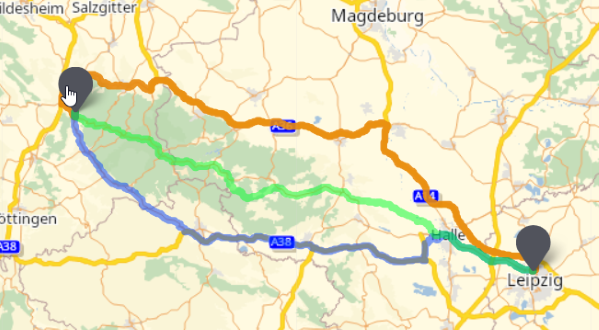
In the above example there are three routes:
- The blue route (‘FAST’) mainly using the motorway
- The orange route (‘SHORT’) mainly using rural roads with shorter distance but higher travel times
- The green route (‘SHORTEST’) using smaller roads more frequently with an even shorter distance at the expense of significantly higher travel times
Please note that all three modes do not strictly calculate the absolutely fastest or shortest route, but the results are still valid. Just play around with our revised code sample or have a look on the technical concept for more details.
To keep yourself updated about upcoming releases and news you can use the subscribe function on the right hand side. If you got any question do not hesitate to get in contact.